My Dog Cost Me Some Productivity, So I Added AI
Like many dog parents, I have a small habit that looks innocent from the outside.
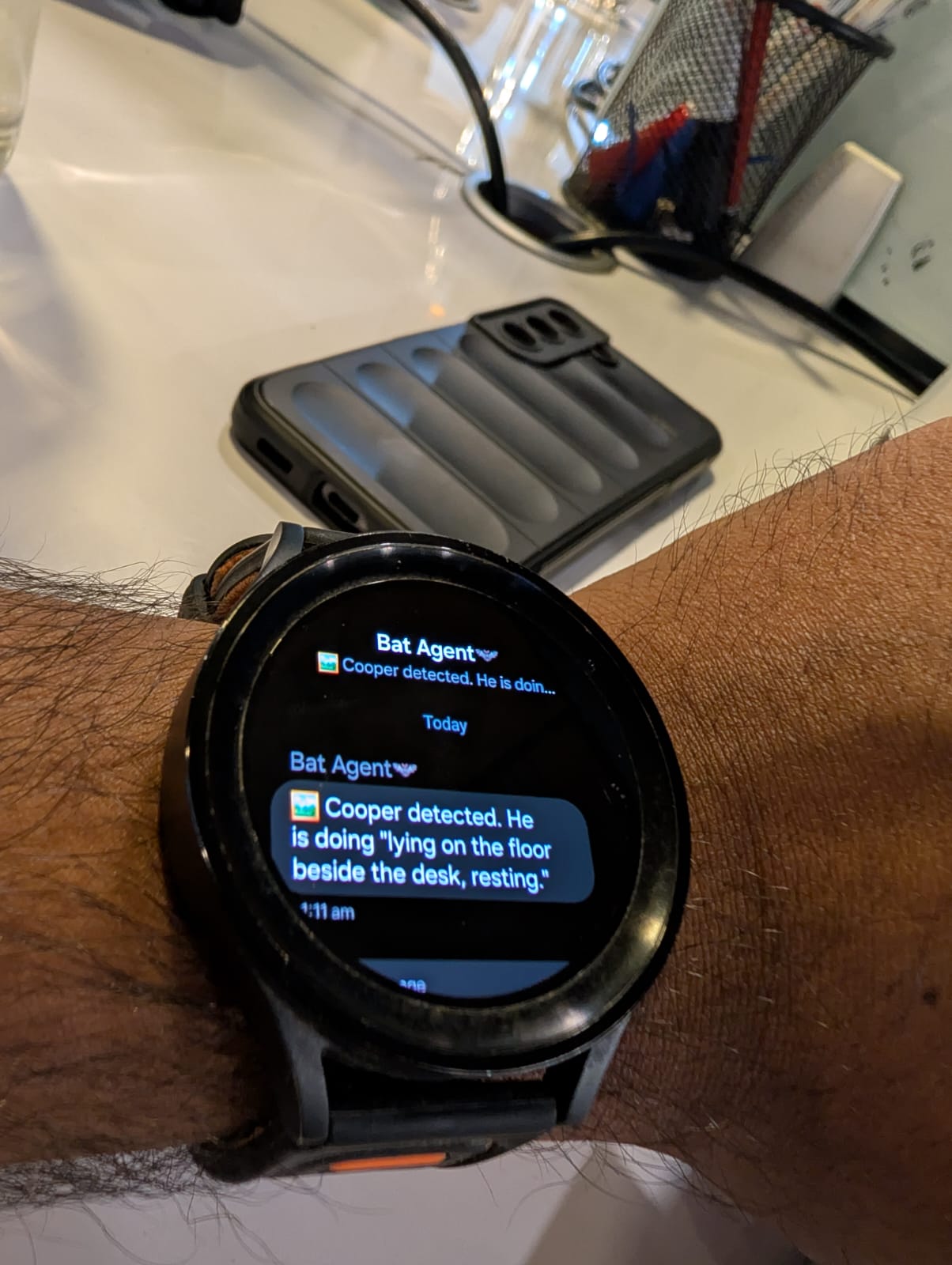
When I am at the office, I periodically check what my Labrador, Cooper, is doing at home. The intention is simple: make sure he is fine, see whether he is sleeping, and get back to work.
The actual workflow was not that clean.
Take out phone
Open camera app
Check Cooper for 10 seconds
Notice notifications
Open Reddit
Open Twitter / X
Lose a few minutes
I was not really checking Cooper anymore. I was accidentally starting a mini doomscrolling session every time I opened the phone.
One weekend I started thinking:
What if my personal AI assistant could check on Cooper for me and only tell me what I actually need to know?
That sounded like a better interface than another camera app.
The Problem With Existing Camera AI
My IP camera already has cloud-based monitoring features. It can detect motion, identify events, and send notifications.
But there were three problems:
- It requires a paid subscription.
- The processing goes through the vendor's cloud.
- A third party is effectively handling video from inside my home.
I was not comfortable with that.
The whole reason I built my personal home AI server was to keep experiments like this under my control. So instead of paying for cloud AI, I decided to build my own small version.
Step 1: Get The Camera Stream
My first thought was to use the camera vendor's developer APIs. After some research, I found that their APIs still route through their cloud services.
That defeated the point.
Fortunately, the camera is IP-based, so I started digging through forums, documentation, and random posts from people doing similar projects. Eventually I found the piece I needed: RTSP support.
RTSP, or Real Time Streaming Protocol, gives direct access to the camera stream over the local network. No subscription. No cloud processing. No vendor AI layer in the middle.
After some trial and error with URLs, authentication, and camera settings, I had a working local stream.
IP Camera
   ↓
RTSP Stream
   ↓
Local Network
That was the first real win. I could now access the feed directly from my own network.
Step 2: Capture One Frame
Once the RTSP stream worked, the next step was simple. I wrote a small Python script that connects to the stream, captures the latest frame, and saves it as an image.
RTSP stream
   ↓
Python script
   ↓
Latest frame image
At this point I could run one command and instantly get the latest picture of Cooper.
That was useful, but it still was not the real goal. I did not want another image to look at. I wanted to stop opening my phone.
Step 3: Let The LLM Look
This is where AI became useful.
Instead of viewing the image myself, I passed the captured frame to a local LLM and used a very simple prompt:
Describe what Cooper is doing.The model returned short descriptions like:
- Cooper is sleeping near the sofa.
- Cooper is sitting near the door looking outside.
- Cooper appears to be resting on the floor.
- Cooper is standing and looking toward the camera.
That was exactly the information I wanted.
Not the video. Not the image. Just the answer.
Step 4: Automate The Workflow
I already run a personal AI assistant on my self-hosted VPS using an old laptop. So I plugged the camera-checking script into that agent workflow.
The logic is straightforward:
8:30 AM
Assistant asks: Working from home or office?

If WFH:
  Do nothing

If Office:
  Enable Cooper monitoring
During office hours, the assistant runs on a configurable interval.
Every hour:
  1. Capture frame from RTSP stream
  2. Send frame to local LLM
  3. Generate short description
  4. Send notification
The assistant only bothers me with the summary. It handles the boring part in the background.
The Watch Made It Click
This project became genuinely useful when the notification moved from my phone to my smart watch.
My phone receives hundreds of notifications. My watch only gets the important ones. So now, instead of opening a camera app, I glance at my wrist and see something like:
Cooper is sleeping peacefully near the sofa.
or:
Cooper is sitting by the balcony door watching outside.
That is all I need.
Five seconds. Peace of mind. Back to work.
Or more realistically, back to breaking production systems 😅
Architecture
RTSP Camera
   ↓
Python Frame Capture
   ↓
Local LLM
   ↓
OpenClaw Agent
   ↓
Phone / Watch Notification
The stack is small, but it connects the pieces I already had into a much better workflow.
Tech Stack
- RTSP camera stream
- Python frame capture script
- Local LLM
- OpenClaw agent
- Personal VPS hosted on an old laptop
- Phone and smart watch notifications
Why I Like This Approach
The interesting part is that this project is not really about AI for the sake of AI. It is about removing friction from a daily habit.
The old workflow looked like this:
Human
   ↓
Open app
   ↓
Watch video
   ↓
Interpret situation
The new workflow looks like this:
AI
   ↓
Watch video
   ↓
Interpret situation
   ↓
Notify human
The AI does the repetitive part. I only consume the final result.
Because everything runs locally, I also avoid the parts I did not want in the first place:
- No cloud subscription
- No third-party monitoring
- No vendor AI service
- No recurring cost
- Full control over the pipeline
Final Thoughts
This started as a simple question:
Can AI check on my dog so I do not have to open my phone?
A few hours of research, some Python code, and a bit of automation later, the answer became yes.
Now Cooper gets monitored, I get peace of mind, and my screen time is slightly lower.
Most importantly, I no longer need to open my phone every hour just to confirm that my Labrador is doing exactly what Labradors do best:
Sleeping.